
Key Highlights:
- Microsoft Fabric Data Agents enable conversational AI, allowing teams to ask business questions in simple language and receive real-time, data-backed answers.
- They reduce reporting delays and help leaders make faster decisions without relying heavily on dashboards or manual reports.
- By integrating with the Microsoft Fabric Platform and Power BI, they help businesses unlock greater ROI from existing Microsoft investments.
Every enterprise today has data. Dashboards. Reports. Alerts. KPIs.
And yet, decision-makers are still asking the same question: Can someone quickly pull the numbers or get me this data?
The problem isn’t data availability. It’s data accessibility.
Leaders don’t want to navigate 10 dashboards. Analysts don’t want to spend hours answering repetitive queries. Business teams don’t want to wait in reporting queues. They want instant clarity, delivered in plain language.
That’s where Microsoft Fabric Data Agents change the game.
Built inside the unified Microsoft Fabric Platform, these AI-powered agents are integrated with capabilities like Microsoft Fabric Copilot and bring conversational intelligence to structured business data, securely, scalably, and in real time.
Let’s keep reading to know more about Microsoft Fabric data agents, why use it, Microsoft Fabric implementation, best practices for data agents & beyond.
What Are Microsoft Fabric Data Agents?
Microsoft Fabric Data Agents are AI-powered, conversational assistants built within the unified Microsoft Fabric environment, allowing users to interact with enterprise data in natural language.
Instead of navigating multiple dashboards or waiting for analysts to generate reports, business users can simply ask questions like:
- What were last quarter’s profit margins by region?
- Which products saw declining sales this month?
- What’s the forecast for next quarter based on current trends?
The system then responds with contextual, data-backed insights in real time.
Fabric data agents are a new Microsoft Fabric feature that enables you to build your own conversational Q&A systems by using generative AI, making data insights more accessible and actionable for everyone in your organization. – Microsoft documentation on Fabric Data Agents.
How Data Agents Work in Microsoft Fabric?
To understand the value of Microsoft Fabric Data Agents, it’s important to understand how they actually work inside the Microsoft Fabric Platform.
The process is simple on the surface: you ask a question, and you get an answer.
But behind the scenes, a powerful AI-driven system is working in a structured and secure way. Here’s how?
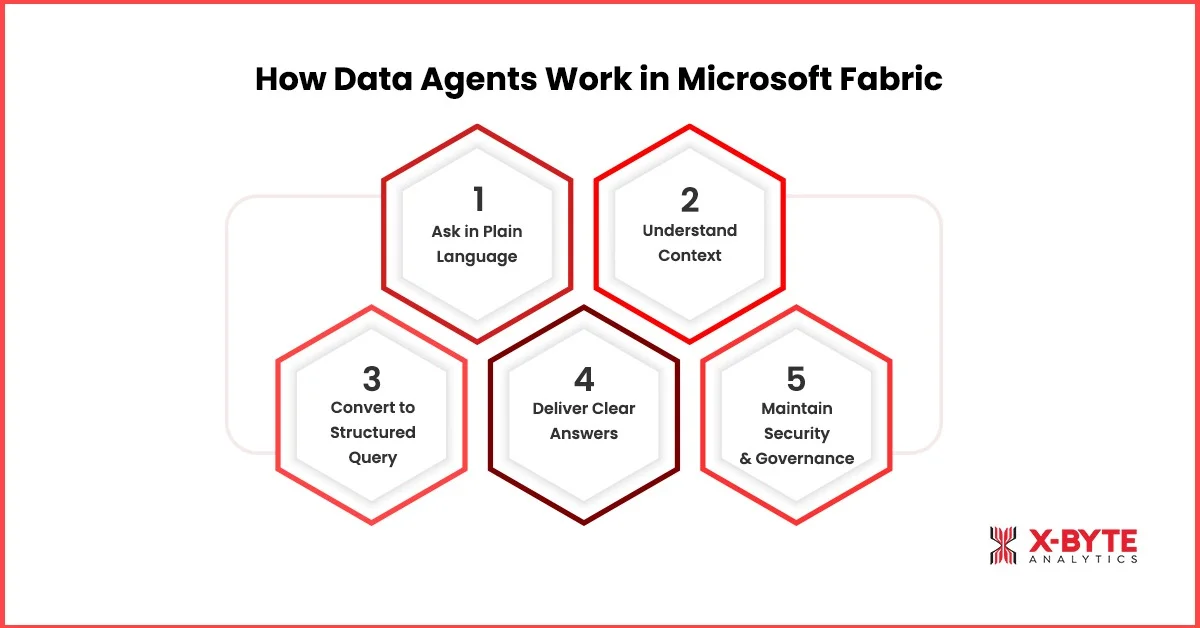
1. You Ask a Question in Simple, Plain Language
With Data Agents in Microsoft Fabric, business users interact with data conversationally.
Example:
- Why did revenue drop last week?
- Which region has the highest operating cost this quarter?
- What’s our projected sales trend for next month?
No SQL. No complex filters. AI agents in Microsoft Fabric use natural language processing to understand intent, not just keywords.
2. The Agent Understands Context Using Semantic Models
Once the question is asked, the Microsoft Fabric AI agents don’t directly hit raw data tables.
Instead, they rely on:
- Governed semantic models
- Power BI datasets
- Lakehouse architecture
- Structured enterprise data inside the Microsoft Fabric Platform
This ensures:
- Consistent KPIs definitions
- Reliable decision-making
- No metric discrepancies
So if two leaders ask about profit, they see the same governed definition, not conflicting numbers.
3. The Agent Translates the Question into a Structured Query
Behind the scenes, the Data Agent converts your natural language question into a structured data query.
As part of this structured workflow, the agent:
- Identifies relevant tables
- Applies predefined business rules
- Pulls the right metrics
- Runs calculations securely
This is where Microsoft Fabric Copilot capabilities and AI reasoning enhance query accuracy. The process is automated, but fully aligned with your enterprise data structure.
4. It Delivers a Clear, Contextual Answer
Instead of presenting raw tables or complex query outputs, Microsoft Fabric Data Agents provide clear, business-ready responses.
These responses typically include:
- A direct, conversational answer
- Supporting metrics
- Contextual explanation
- Sometimes, visual elements as well (if connected to Power BI)
The response is conversational, but grounded in governed enterprise data. That means leadership gets clarity without needing technical interpretation.
5. Security & Governance Stay Intact
One of the biggest advantages of Data Agents in Microsoft Fabric is that they operate within the existing security framework.
Within this secure framework, the agents:
- Respect role-based access controls
- Follow data governance policies
- Ensure compliance standards
- Prevent unauthorized visibility
This makes Microsoft Fabric Implementation safe for enterprise-scale AI adoption.
Why Microsoft Fabric Data Agents Matter: Key Benefits & Business Impact?
Modern enterprises generate massive volumes of data, but insight often arrives too late to influence outcomes. Microsoft Fabric Data Agents bridge the gap between data and decision-making by enabling instant, AI-driven access to trusted business information. Instead of waiting on reports or dashboards, leaders can interact with data conversationally and act in real time.
Below are the key benefits and measurable business impacts these data agents deliver.
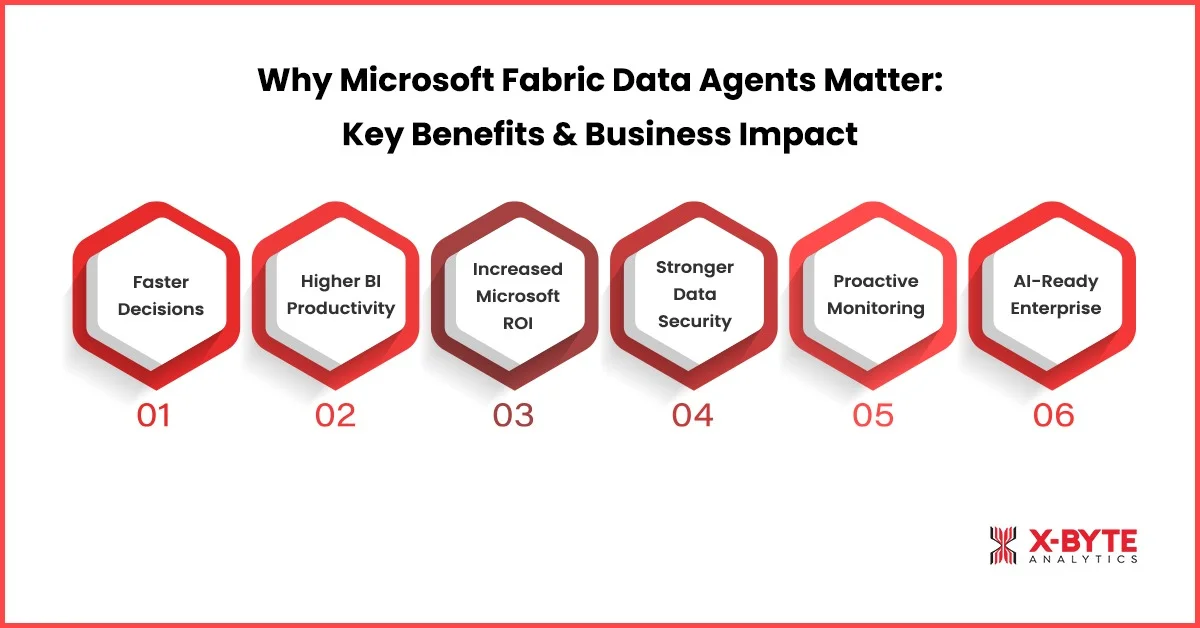
1. Cut Decision Delays from Days to Minutes
You don’t have time to wait 2 days for a report to get an answer. When something goes wrong, sales drop, costs increase, margins shrink, you need answers immediately.
Microsoft Fabric Data Agents let you ask questions in plain English and get instant answers from your company data. No dashboard hunting. No back-and-forth emails. No waiting. Just clean answers in real-time.
Why This Matters to Your Business?
- Faster answers mean faster decisions, reducing revenue leakage and operational inefficiencies.
- Monthly and quarterly business reviews become insight-driven instead of report-dependent.
- Reduces turnaround time for urgent strategic queries from days to minutes.
Example: A retail enterprise notices a sudden dip in weekly revenue. Instead of escalating a report request, leadership asks: Which product category caused the margin decline in the West region this week? The Data Agent delivers the answer immediately, enabling corrective pricing or promotion strategy the same day.
2. Increase BI Team Productivity by 20–30%
Most BI teams spend a significant portion of their time answering repetitive business queries. Microsoft Fabric Data Agents automate these routine questions, allowing data professionals to focus on advanced AI data analytics and strategic initiatives.
Why This Matters to Your Business?
- Reduces analyst workload tied to repetitive dashboard pulls and ad-hoc queries.
- Supports scalable analytics operations without increasing hiring costs.
- Frees your data team to work on forecasting, predictive models, and AI initiatives.
Example: if your analytics team handles 300 recurring performance queries per month, even automating 25% of them can free up significant hours, equivalent to adding analytical capacity without adding headcount.
3. Unlock Higher ROI from Your Existing Microsoft Investment
You’ve already invested in Microsoft tools, Power BI, cloud storage, and data platforms.
But not everyone in your company is actually using them? Usually, only technical teams do.
Microsoft Fabric Data Agents make your data usable for sales heads, finance managers, and operations teams without technical training. And, Organizations that effectively leverage AI in analytics report 5–6% higher profit margins than peers.
Why This Matters to Your Business?
- Reduces shadow reporting and spreadsheet dependency.
- Maximizes return on existing Microsoft ecosystem investments.
- Turns analytics into a daily decision-making tool, not just a reporting system.
4. Stronger Data Security with AI Agents in Microsoft Fabric
When leaders hear AI, the first concern is risk. Will data remain secure? Will access stay controlled?
The good news, Data Agents in Microsoft Fabric operate inside the secure Microsoft Fabric Platform, following role-based access and governance rules. So users only see what they’re allowed to see.
Business Impact:
- Keeps sensitive financial and operational data protected.
- Maintains compliance standards across departments.
- Reduces risk of data leaks from manual exports or spreadsheets.
- Builds trust in AI-driven insights.
When security is built into your Microsoft Fabric Implementation, AI adoption becomes safe, scalable, and not risky.
5. Proactive Business Monitoring, Not Just Reports
Traditional reporting tells you what happened last month. Microsoft Fabric AI agents help you understand what’s happening right now.
Instead of waiting for the end-of-month analysis, leaders can ask:
- Are we below margin targets this week?
- Which product line is underperforming today?
And get instant answers.
Business Impact:
- Detects performance issues early.
- Reduces financial surprises at month-end.
- Improves forecasting confidence.
- Enables quicker corrective action.
Even identifying a 2–3% margin gap early can prevent a major quarterly impact. That’s the power of real-time insight through Microsoft Fabric Data Agents.
6. AI-Ready Enterprise Without Rebuilding Everything
Many companies want AI, but fear large-scale disruption. With AI agents in Microsoft Fabric, you don’t need to replace your entire data stack. These capabilities are built directly into the Microsoft Fabric Platform.
That means modernization without chaos.
Business Impact:
- Protects your existing Power BI and data investments.
- Enables gradual, controlled AI adoption.
- Speeds up digital transformation initiatives.
- Positions your organization as future-ready.
When supported by the right Microsoft Fabric Migration Services and Microsoft Power BI Consulting Services, businesses move from basic reporting to intelligent, AI-driven decision-making without operational disruption.
Transform Your Data Strategy with Microsoft Fabric Data Agents.
How to Create Your First Microsoft Fabric Data Agent: Step-by-Step Guide
If you’re starting fresh or not yet using the Microsoft Fabric Platform, here’s the full process, broken into simple, manageable phases.
The goal isn’t just to create Microsoft Fabric Data Agents. The goal is to build a strong foundation so those agents deliver accurate, secure, and meaningful insights.
Phase 1: Build the Right Data Foundation
Before enabling Data Agents in Microsoft Fabric, your data must be centralized, standardized, and trusted.
Step 1: Assess Your Current Data Environment
Identify where your data resides, how it is structured, and whether inconsistencies or silos exist across departments.
Start by understanding:
- Where does your data currently live? (ERP, CRM, Excel, on-prem databases)
- Are KPIs consistent across departments?
- Are there reporting silos?
Most enterprises discover multiple disconnected data sources. This is often where Microsoft Fabric migration services help consolidate everything into a unified analytics environment.
Step 2: Set Up the Microsoft Fabric Platform
Create a centralized analytics environment that will host your unified data and governance framework.
This includes:
- Creating Microsoft Fabric workspaces
- Configuring OneLake storage
- Set up a Lakehouse or Data Warehouse
- Defining governance and access rules
This environment becomes your single source of truth and the backbone of a structured Microsoft Fabric implementation.
Step 3: Migrate & Clean Your Data
Move enterprise data into Microsoft Fabric and standardize it for consistency and accuracy.
Key actions include:
- Connect source systems
- Ingest historical data
- Standardize formats
- Remove duplicates
- Align definitions
The goal is one consistent dataset across the organization. Without clean and standardized data, AI agents cannot deliver reliable answers.
Phase 2: Create a Strong Business Logic Layer
Now that your data is centralized, you define how your business measures performance.
Step 4: Build Semantic Models
Define business calculations and relationships so all reporting follows the same logic.
Inside the Microsoft Fabric Platform:
- Define revenue calculations
- Standardize margin formulas
- Create relationships between tables
- Validate KPI definitions
This ensures that when leadership asks about profit, everyone sees the same number. Many companies use Microsoft Power BI Consulting Services here to ensure enterprise-grade modeling.
Strong semantic models lead to accurate and trustworthy Data Agents.
Phase 3: Enable Microsoft Fabric Data Agents
With governance and business logic in place, you are ready to activate AI.
Step 5: Create Your First Microsoft Fabric Data Agent
Deploy a Data Agent connected to your governed semantic model.
Inside your workspace:
- Select the semantic model
- Create a new Data Agent
- Connect it to your governed dataset
- Define its scope
Now your AI agents in Microsoft Fabric are layered on top of your enterprise data.
Step 6: Configure Business Instructions
Define how the Data Agent should interpret business terminology, fiscal structures, and response formats.
You define:
- How fiscal year works
- Custom business terminology
- Preferred response format
- Example business queries
You are essentially teaching the Data Agent how your organization defines and interprets performance.
Step 7: Apply Security & Access Controls
Align the Data Agent with existing role-based permissions and data visibility rules.
Ensure:
- Role-based access is properly configured
- Sensitive financial or HR data is restricted
- Departmental visibility rules are enforced
The Data Agent automatically follows these governance policies.
Phase 4: Test, Roll Out & Scale
Before the large-scale rollout, make sure to test, then roll out gradually, and then scale accordingly.
Step 8: Test with Real Business Questions
Before company-wide rollout, test it with actual leadership queries:
- Why did operating costs increase last month?
- Which region has the lowest growth rate this quarter?
- Compare revenue vs target for this week.
Evaluate:
- Accuracy
- Consistency
- Security alignment
Refine where necessary before expansion.
Step 9: Start Small & Expand Gradually
Avoid organization-wide rollout on day one.
Start with:
- Finance team
- Sales leadership
- Operations heads
Collect feedback. Improve performance. Then expand.
This phased approach ensures the successful adoption of Microsoft Fabric Data Agents.
How X-Byte Analytics Helps with Microsoft Fabric Implementation?
Implementing Microsoft Fabric is not just about deploying a platform; it’s about building a reliable, scalable data ecosystem that supports AI-driven decision-making.
At X-Byte Analytics, we help organizations adopt the Microsoft Fabric Platform, exactly that.
Why X-Byte Analytics & How We Help?
- Strategic Data Analytics Consulting Services:We assess your current data systems, identify silos, and create a clear roadmap for successful Microsoft Fabric implementation.
- End-to-End Microsoft Fabric Migration Services: We centralize your data into a unified environment, set up Lakehouse or Warehouse architecture, and ensure clean, governed datasets.
- Expert Power BI Consulting Services: We design optimized semantic models, standardize KPIs, and improve report performance, forming the backbone for accurate Data Agents in Microsoft Fabric.
- Power Platform Consulting Services for Automation: We extend your Microsoft ecosystem with automation and workflow integration, improving operational efficiency.
- AI-Ready Configuration of Microsoft Fabric Data Agents: We configure and align AI agents in Microsoft Fabric with your business logic so leaders get reliable, real-time answers.
- Governance, Security & Compliance Setup: We implement role-based access control and data governance policies within the Microsoft Fabric Platform.
- Phased Rollout & Adoption Strategy: We help you start small, test real use cases, and scale gradually, ensuring measurable ROI from your Microsoft Fabric investment.
Ready to unlock the full potential of Microsoft Fabric Data Agents and build a smarter, AI-driven analytics ecosystem?
If you are ready and looking to choose the right Microsoft Power BI partner for your business, then connect with X-Byte Analytics for expert-led Microsoft Fabric Implementation, seamless Microsoft Fabric Migration Services, and performance-focused Power BI consulting services tailored to your business goals.
Partner with X-Byte Analytics Today and Power Up Your Microsoft Fabric Data Agents.
Conclusion
Microsoft Fabric Data Agents make it easier for businesses to get answers from their data. Instead of depending only on dashboards or waiting for reports, teams can ask questions in simple language and get clear insights from the Microsoft Fabric Platform.
This helps leaders make faster decisions, improves productivity, and encourages more teams to use trusted company data.
When planned and implemented properly, Data Agents in Microsoft Fabric can simplify how your organization works with data without adding complexity.
If you’re considering Microsoft Fabric for your business, X-Byte Analytics can support you with data analytics consulting services, Power BI consulting services, and end-to-end Microsoft Fabric implementation and migration guidance, helping you build a strong and reliable data foundation for long-term growth. Get in touch with our data experts today.