

Key Highlight
- End-to-End Cloud Migration Framework: Covers cloud migration fundamentals, proven strategies, challenges, and best practices with a clear, step-by-step execution roadmap.
- Business-First Cloud Value: Explains how cloud migration drives cost optimization, scalability, security, resilience, and faster innovation while minimizing risk and downtime.
- Expert-Led, Risk-Aware Approach: Demonstrates how structured planning, phased migration, governance, and performance optimization ensure secure, compliant, and future-ready cloud adoption.
As businesses accelerate their digital transformation efforts, cloud adoption has become a strategic priority. Organizations across industries are turning to the cloud to improve agility, reduce infrastructure costs, and support scalable growth. This shift has made understanding the best practices for cloud migration essential for long-term success.
Despite its advantages, cloud migration is not always straightforward. Many organizations hesitate due to concerns around complexity, data security, legacy infrastructure, and downtime. Without a clear strategy, migrating from on-premises systems to the cloud can become time-consuming and risky.
By understanding what is cloud migration and following a structured, step-by-step approach, businesses can minimize disruptions and maximize value. This guide explores why cloud migration matters, its benefits and challenges, proven cloud migration strategies, and best practices to ensure a smooth and successful transition.
What Is Cloud Migration?
Cloud migration is the process of moving data, applications, and workloads from on-premises infrastructure to a cloud-based environment. This may include public, private, or hybrid cloud platforms depending on business requirements. The primary goal of cloud migration is to improve scalability, performance, and cost efficiency.
When businesses ask what is cloud migration, the answer goes beyond simply transferring data. It involves modernizing IT systems, adopting cloud-native services, and rethinking how applications are deployed, managed, and scaled. A successful cloud migration ensures minimal disruption while enhancing operational agility.
Cloud migration can be complex due to dependencies between applications, data security requirements, and legacy infrastructure limitations. This is why organizations need a structured migration plan backed by analytics and expert guidance. We help enterprises evaluate readiness, choose the right migration approach, and execute cloud transitions with confidence.
Why Cloud Migration Matters
Cloud migration matters because businesses today must operate faster, scale smarter, and respond quickly to changing market demands. Traditional on-premises infrastructure often limits flexibility and increases operational costs, making it difficult for organizations to innovate at speed.
By migrating to the cloud, enterprises gain access to on-demand computing resources, advanced security capabilities, and modern analytics tools. This shift enables improved performance, higher availability, and better support for remote and distributed workforces.
Cloud migration also plays a critical role in cost optimization and risk reduction. With pay-as-you-go pricing models, businesses can control IT spending while reducing downtime and improving disaster recovery capabilities.
We help organizations leverage cloud migration as a growth enabler—using data-driven insights to align cloud investments with business objectives, compliance needs, and long-term scalability goals.
Benefits of Cloud Migration
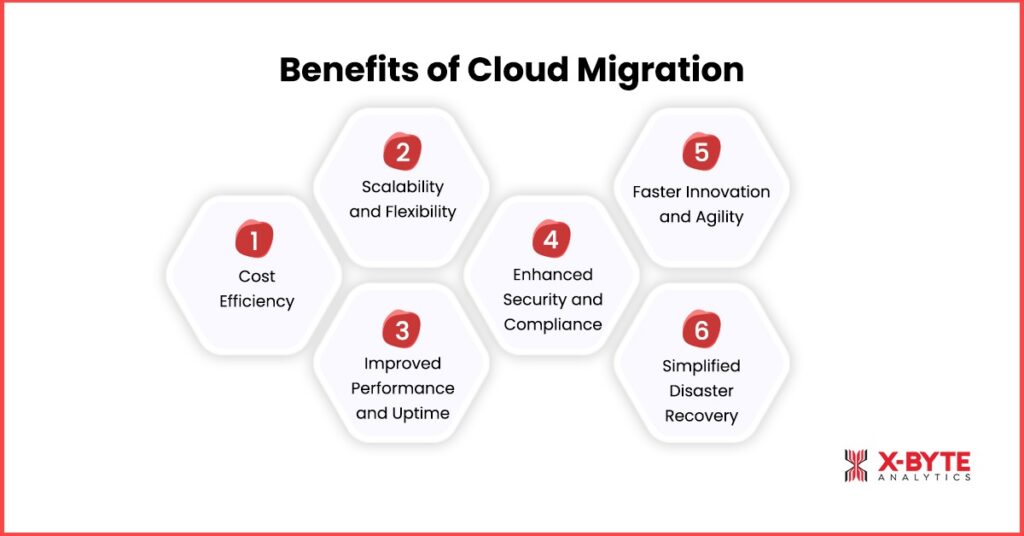
1. Cost Efficiency
Migrating to the cloud reduces the need for physical infrastructure and ongoing maintenance costs. Businesses pay only for the resources they use, allowing them to scale operations without unnecessary spending. This pay-as-you-go model also helps optimize budgets and improve overall cost management.
2. Scalability and Flexibility
Cloud environments make it easy to scale resources up or down based on demand. Whether traffic spikes during peak periods or storage needs grow rapidly, businesses can adjust quickly without downtime or delays. This flexibility ensures IT resources are always aligned with business needs.
3. Improved Performance and Uptime
Cloud providers offer high availability and reliability, often guaranteeing 99.9% uptime. This minimizes downtime and ensures applications and services remain accessible to employees and customers, improving productivity and user experience.
4. Enhanced Security and Compliance
Cloud platforms come with advanced security measures, including data encryption, access control, and continuous monitoring. Many providers also comply with major regulations like GDPR, HIPAA, and PCI-DSS, helping businesses maintain data protection and reduce compliance risks.
5. Faster Innovation and Agility
Cloud migration enables businesses to adopt new technologies such as AI, analytics, and IoT with minimal setup time. Organizations can experiment, deploy, and scale solutions faster, which drives innovation and gives a competitive advantage in rapidly changing markets.
6. Simplified Disaster Recovery
Cloud environments provide backup and failover options, allowing businesses to recover quickly from unexpected outages, natural disasters, or cyber incidents. This ensures business continuity while reducing the time and cost associated with traditional disaster recovery setups.
Start Your Cloud Migration With Confidence-Talk to Our Experts And Get A Secure, Scalable Roadmap Tailored To Your Business.
Cloud Migration Strategies
Successfully migrating to the cloud requires a well-planned strategy tailored to your business needs and IT environment. Different workloads, applications, and organizational goals call for different approaches. Here are the most common cloud migration strategies:
1. Rehosting (Lift and Shift)
Rehosting involves moving applications and workloads from on-premises infrastructure to the cloud without significant changes. This is the fastest approach and minimizes upfront costs. However, some workloads may not be fully optimized for cloud performance and could require later adjustments.
2. Replatforming (Lift, Tinker, and Shift)
Replatforming makes minor adjustments to applications during migration to leverage cloud migration services, such as managed databases or load balancers. This approach improves performance and efficiency without completely rewriting the code. It’s ideal for businesses seeking immediate benefits without a full-scale transformation.
3. Refactoring (Rearchitecting)
Refactoring involves redesigning and optimizing applications to take full advantage of cloud-native features, such as microservices, containers, and serverless architectures. While more time-intensive, this strategy future-proofs IT systems, improves scalability, and maximizes cloud capabilities.
4. Repurchasing (Move to SaaS)
Repurchasing replaces existing on-premises software with cloud-based alternatives or SaaS solutions. For example, a legacy CRM can be migrated to a cloud-hosted CRM platform. This approach reduces infrastructure management but may require workflow adjustments.
5. Retaining (Hybrid or Partial Migration)
Some legacy applications may be too critical or complex to migrate immediately. Retaining involves keeping these systems on-premises while moving other workloads to the cloud. This hybrid approach allows businesses to migrate gradually and mitigate risk.
6. Retiring (Decommissioning Unnecessary Workloads)
During migration, some applications may no longer provide value or may be redundant. Retiring involves decommissioning these workloads to simplify operations, reduce costs, and focus on systems that bring real business value.
By choosing the right strategy—or a combination of strategies—organizations can reduce migration risk, optimize costs, and ensure a smoother transition to the cloud.
Plan, Migrate, And Optimize Your Cloud Journey With X-Byte Analytics—Get A Free Consultation From Our Cloud Specialists Today.
Challenges of Cloud Migration
While cloud migration offers significant benefits, organizations often face several challenges that can impact timelines, costs, and performance. Understanding these challenges beforehand helps ensure a smoother transition.
1. Complex Legacy Systems
Many businesses rely on older on-premises systems that weren’t designed for cloud environments. Migrating these systems can require extensive reconfiguration, code rewriting, or even refactoring, which increases project complexity and duration.
2. Data Security and Compliance
Moving sensitive data to the cloud introduces potential security risks. Organizations must ensure encryption, access controls, and monitoring are in place. Compliance with regulations like GDPR, HIPAA, or PCI-DSS is also critical to avoid fines and protect customer trust.
3. Downtime and Business Disruption
Cloud migration can require planned downtime, which may affect operations, revenue, and customer experience. Without careful planning and staged migration, organizations risk significant disruptions during the transition.
4. Cost Overruns
Cloud pricing models can be complex, and unexpected usage or inefficient resource allocation may lead to higher costs. Organizations need careful cost analysis and continuous monitoring to avoid overspending post-migration.
5. Compatibility and Integration Issues
Applications may have dependencies on specific operating systems, databases, or network setups. Ensuring compatibility with cloud integration services is essential to maintain performance and prevent operational issues.
6. Vendor Lock-in
Relying heavily on a single cloud provider can limit flexibility. Organizations may face challenges if they later decide to switch providers or adopt a multi-cloud strategy. Choosing vendor-agnostic tools and planning for portability is key.
By proactively addressing these challenges, organizations can reduce risks, ensure business continuity, and maximize the benefits of cloud migration.
Best Practices for Cloud Migration
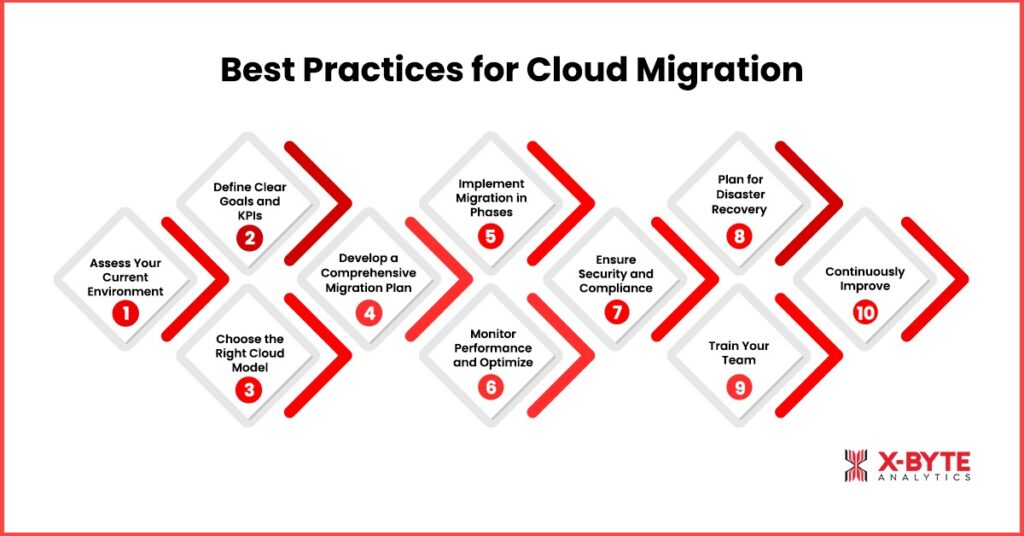
Successfully moving to the cloud requires careful planning, strategic execution, and ongoing optimization. Following proven best practices of cloud migration ensures a smoother migration and maximizes the benefits of cloud adoption.
1. Assess Your Current Environment
Start by evaluating your existing IT infrastructure, applications, and data. Conduct a cloud readiness assessment to identify dependencies, workloads suitable for migration, and potential challenges. This step helps prioritize which applications to migrate first and reduces the risk of unexpected issues.
2. Define Clear Goals and KPIs
Determine what you want to achieve with cloud migration. Whether it’s cost savings, improved performance, or enhanced scalability, set measurable key performance indicators (KPIs) to track progress and success throughout the migration process.
3. Choose the Right Cloud Deployment Model
Decide between public, private, hybrid, or multi-cloud environments based on your business needs, regulatory requirements, and existing infrastructure. Selecting the right model ensures flexibility, security, and cost-efficiency.
4. Develop a Comprehensive Migration Plan
Create a detailed roadmap outlining which applications and data will be migrated, in what order, and who will be responsible. Include timelines, milestones, and contingency plans to handle potential challenges during the migration process.
5. Implement Migration in Phases
Avoid a “big bang” approach by migrating workloads in stages. Start with low-risk applications to test processes and resolve issues early. Gradually move critical systems to ensure business continuity and minimize downtime.
6. Monitor Performance and Optimize
Track application performance and resource utilization before, during, and after migration. Use monitoring tools to identify bottlenecks, optimize cloud usage, and control costs. Continuous monitoring ensures the cloud environment operates efficiently.
7. Ensure Security and Compliance
Implement strong security measures, including data encryption, access controls, and threat monitoring. Make sure your cloud environment complies with industry regulations and internal security policies to protect sensitive information.
8. Plan for Disaster Recovery and Business Continuity
Leverage cloud-native disaster recovery options to safeguard your data and maintain operations during unexpected events. Document recovery procedures and responsibilities to minimize downtime in case of disruptions.
9. Train Your Team
Provide training for employees on cloud tools and best practices. Ensuring your team is well-prepared helps avoid errors, improves adoption, and enhances the overall efficiency of the cloud environment.
10. Continuously Improve
Cloud migration is not a one-time task. Continuously review your cloud setup, optimize workloads, and update your strategy to adapt to evolving business needs, technology advancements, and industry regulations.
By following these best practices, organizations can maximize the value of cloud adoption while minimizing risks, downtime, and costs.
How to Do Cloud Migration: A Step-by-Step Process
A well-planned approach is critical to ensure a successful cloud transition. Following a structured process helps organizations minimize risk, control costs, and achieve long-term value from cloud adoption. Below is a step-by-step guide aligned with the best practices for cloud migration.
Step 1: Define Cloud Migration Goals
Start by clearly identifying your business objectives for cloud migration. Whether the goal is cost reduction, scalability, or improved performance, clear goals guide technical and strategic decisions throughout the process.
Step 2: Assess Existing Infrastructure
Evaluate your current IT environment, including applications, data, hardware, and dependencies. This assessment helps determine which workloads are cloud-ready and which require modification or modernization.
Step 3: Choose the Right Cloud Model
Select a cloud deployment model—public, private, hybrid, or multi-cloud—based on security, compliance, and performance needs. Choosing the right model ensures alignment with both technical and business requirements.
Step 4: Create a Cloud Migration Plan
Develop a detailed migration roadmap that outlines timelines, responsibilities, tools, and risk mitigation strategies. A clear plan helps reduce downtime and ensures accountability at every stage.
Step 5: Execute, Test, and Optimize
Begin migrating workloads in phases to minimize disruption. After migration, conduct performance testing, security validation, and cost optimization to ensure the cloud environment operates efficiently.
Conclusion
Cloud migration is a transformative step that can unlock scalability, cost efficiency, and improved business agility. However, without a clear strategy and proper execution, organizations risk downtime, security challenges, and cost overruns.
X-Byte Analytics helps businesses navigate this transition with tailored cloud migration solutions. From assessing your current IT environment to selecting the right cloud deployment model and implementing migration in phases, X-Byte Analytics ensures a smooth and secure migration journey. By leveraging industry best practices, advanced monitoring tools, and expert guidance, organizations can fully harness the benefits of cloud computing while minimizing risks and maintaining business continuity.
With X-Byte Analytics, businesses don’t just migrate to the cloud—they transform their IT infrastructure to drive innovation, efficiency, and growth.